

When you watch a finished film, advert or brand video, you’ll be seeing the heavily edited, cinematic version of events. The truth is, the footage that comes straight out of the camera often looks flat, washed out, and frankly a bit uninspiring. That’s by design. Filmmakers shoot this way because it preserves as much information as possible, giving editors the freedom to work their magic in post-production.
The part of the process where that magic really happens is colour grading. Grading is what takes raw material and turns it into something eye-catching, consistent and aligned with a brand’s identity.
At Turps Film, the final output is never an afterthought. It’s as essential as sound design or editing and discussed as part of the pre-production process. Let’s break down how it works.
Why Raw Footage Looks “Flat”
On professional shoots, we often record in a “log” colour profile. Log is deliberately designed to look grey and low contrast, but it captures an extended dynamic range. In plain English, that means the highlights aren’t blown out and the shadows aren’t crushed. We’re able to recover detail and make precise adjustments later.
If you’ve ever looked at raw log footage, you’ll know it looks underwhelming but it allows the most flexibility in post, through editor-led colour grading that builds the mood and sets the final look.
What is a LUT?
LUT stands for Look-Up Table. It’s essentially a preset that tells editing software how to map one set of colours to another. LUTs can serve two purposes:
- Technical LUTs – Used to convert log footage into a standard format like Rec.709, so it looks “normal” on screens.
- Creative LUTs – Designed to create a particular look or mood, such as emulating a film stock or pushing the palette towards a stylised style.
A LUT applies an instant shift to your footage, but it’s rarely the finished product. Editors usually treat LUTs as a baseline, then refine every shot through detailed colour grading to make sure the final result fits the story, brand, and mood.
The Art of Colour Grading
Where LUTs provide a base, colour grading is the craft of finessing the look. A skilled editor or colourist makes shot by shot decisions that elevate the story. Some of the steps include:
- Balancing cameras: Ensuring all cameras and lenses match seamlessly. ( This used to take a lot longer back in the day! Ever tried to balance an EX3 and a C300? Not fun!)
- Matching shots: Making scenes filmed on different days or lighting conditions consistent. (Shooting day for night? The grade will help sell that effect)
- Guiding emotion: Warm tones can make a care home feel homely; cooler tones can make a tech setting look sharp and innovative.
- Directing focus: Adjustments in brightness or saturation guide the viewer’s eye.
- Refining brand identity: Colour grading ensures the final video feels aligned with brand visuals.
At its best, colour grading is invisible. You don’t notice it consciously but it makes you feel the story more deeply.
Colour Grading in Cinema: Famous Examples
Colour grading is one of cinema’s most powerful storytelling tools. Directors lean on colour grading to set the mood, distinguish between worlds, and draw attention to pivotal moments in a story. A few iconic examples include:
The Matrix (1999): Inside the Matrix, scenes are tinted green, while the real world is graded in colder blues. The contrast makes it instantly clear which reality you’re in.


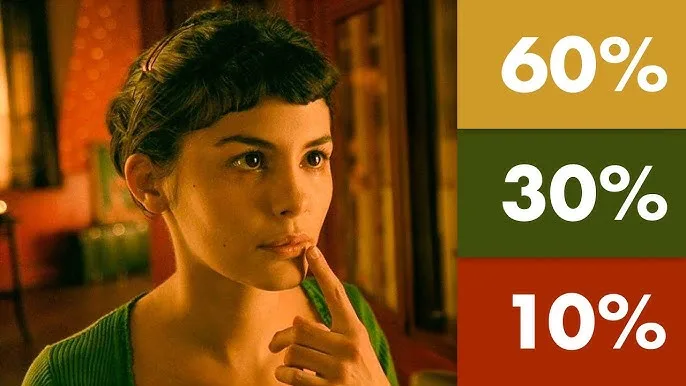
Amélie (2001): Rich reds, greens, and yellows make Paris feel whimsical and heightened, matching the quirky perspective of its main character.

Schindler’s List (1993): Shot in black and white, but with the famous “girl in the red coat.” The selective grade turns one detail into an unforgettable emotional symbol.
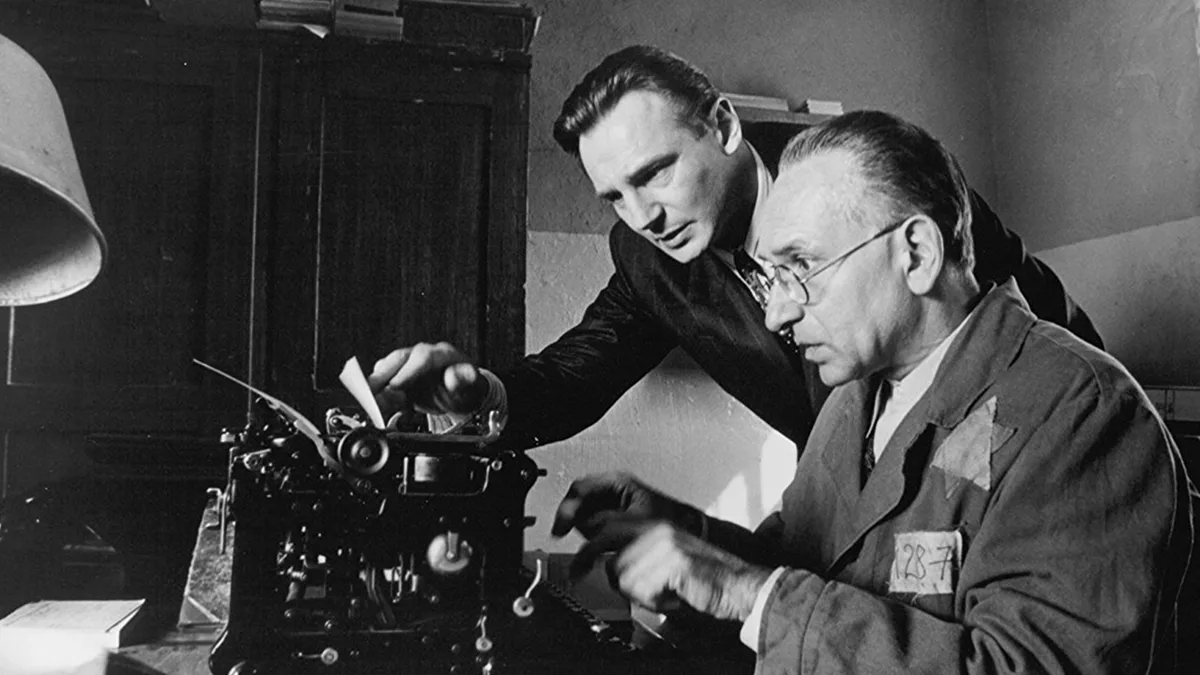

The deliberate uses of colour grading guide how audiences feel. The same principle applies outside of Hollywood whether it’s a brand film, a corporate explainer or product commercial.
Why Colour Grading Matters in Storytelling
Whilst colour grading can be seen as making footage “look nice,” it’s also about ensuring the visuals support the message.
In our St Oswald’s Hospice films, grading leaned on soft, warm tones to bring comfort and authenticity.
For Saint-Gobain Abrasives’ product videos, we sharpened contrasts and crisped detail to highlight technical precision.
In the Weber “It’s a Match” campaign, editors pushed saturation and boldness to grab attention across social media platforms.
Each of these examples shows how grading shapes the emotional and professional impact of a film.
Tools of the Trade
Editors rely on powerful software to get the job done. At Turps Film, that often means working between the Adobe Suite and Davinci Resolve.
Key tools for colour grading include:
- Waveform and vectorscope monitors – for balancing colour scientifically, not just by eye.
- Masks and power windows – to fine-tune specific areas in a frame.
- Secondary corrections – targeting particular colours (such as making a brand’s colour palette stand out).
- Texture and grain – to add subtle film-like qualities.
This mix of science and creativity is what makes editor-driven colour grading so effective.
Consistency Across Deliverables
Modern campaigns often need dozens of assets: long-form videos, short case studies, vertical cutdowns, and social clips. Without consistent colour grading, they risk looking mismatched.
That’s why editors at Turps Film establish a master grade, then adapt it across every deliverable. Whether a video is seen on LinkedIn, Instagram, or in a boardroom presentation, it feels cohesive.
A typical approach to colour workflow:
- Process footage – properly logged and organised.
- Apply technical LUT – bringing log footage into a usable colour space.
- Balance and match – ensuring consistency across shots and cameras.
- Creative grade – building the overall mood.
- Shot-by-shot refinement – guiding attention and emotion.
- Consistency check – across every final output.
Colour grading is one of the final steps that turns footage into a story worth watching. If you’re planning a project and want to be sure your film looks the part as well as tells it, our team can help!
Keep up to date with team Turps news! We regularly post on our blog but you can also find us via social media channels such as Instagram, Facebook and our LinkedIn page. Give us a follow @turpsfilm






Leave A Comment